

AI发票识别 looks like a solved problem until the first audit. Extraction is fast, but invoices are financial documents, and a single transposed digit can break a reconciliation. The goal is not perfect automation. The goal is a repeatable process where every extracted field can be checked against the original image.
This guide covers the five checks we run after extraction, the fields that cause most errors, and the filing rules that make month-end close easier.
Key Takeaways
- Capture a clear image before extraction.
- Check tax IDs digit by digit.
- Keep line items separate.
- Reconcile totals and tax.
- Name files by period and vendor.
Why AI发票识别 Needs a Human Checkpoint
Invoices combine printed text, stamps, tables, and occasional handwriting. AI发票识别 handles printed text well and struggles with the rest. The result is a document that is ninety-five percent correct, which is the most dangerous kind of correct, because reviewers stop looking.
The remedy is a checkpoint, not a rewrite. Decide which fields must be verified on every invoice, regardless of confidence score. Amount, tax ID, invoice number, and date belong on that list. Everything else can be spot-checked in batches.
AI发票识别 also pays for itself in search. Once the fields are structured, you can answer questions that used to require opening PDFs: which vendor raised prices, which invoices are unpaid, and which cost center is over budget. The value is in the structure, not in the typing speed.
How AI发票识别 Works in Five Steps
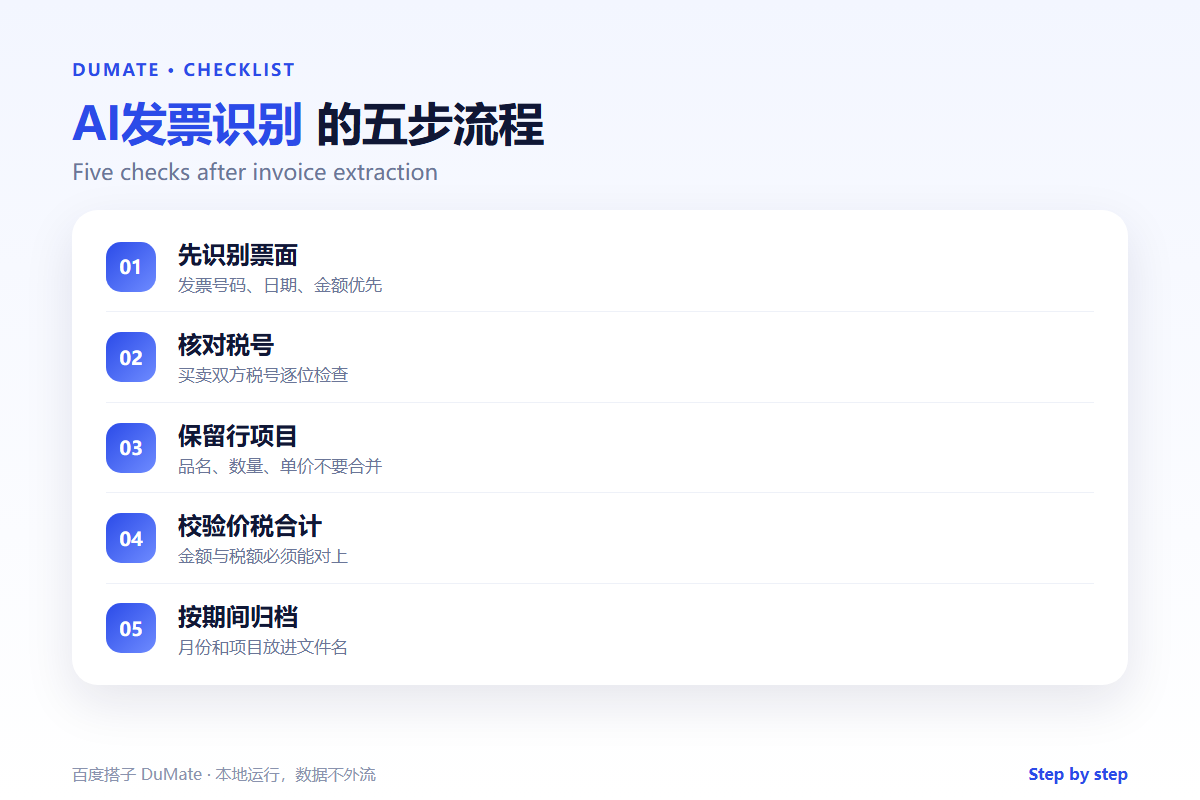
Step 1: Capture a usable image
Shoot straight on, avoid shadows, and keep the whole page in frame. If the invoice arrives as a PDF, extract the original page instead of photographing a screen. Good input removes half the errors before the model runs.
Step 2: Extract the header fields
Pull invoice number, issue date, due date, seller, buyer, and both tax IDs. Verify the tax IDs character by character, because OCR often confuses zero and the letter O, or one and the letter I.
Step 3: Keep line items separate
Do not merge line items into a single total. Keep description, quantity, unit price, tax rate, and amount as separate columns. This is what makes later analysis possible and what makes an audit review quick.
Step 4: Reconcile totals
Check that line items sum to the subtotal, that tax matches the stated rate, and that the grand total matches the invoice. Any mismatch goes to a review queue with the original image attached.
Step 5: File by period and vendor
Use a consistent name: year, month, vendor, invoice number. Store the extracted data next to the image. A clean file name saves minutes every time someone looks for the document.
Fields That Need Extra Care
- Tax IDs, especially mixed letters and digits.
- Decimal separators and currency symbols.
- Discount lines that change the taxable amount.
- Multi-page invoices with a total on the last page.
- Credit notes with negative amounts.
Where AI发票识别 Fails
It fails on crumpled paper, on stamps that cover a number, and on invoices that mix languages in the same line. It also fails when the same vendor changes its template without notice. A monthly spot check catches template changes before they become a batch of bad data.
- Handwritten corrections ignored.
- Tax rates inferred instead of read.
- Duplicate invoices counted twice.
- Currency conversion applied silently.
Before and After
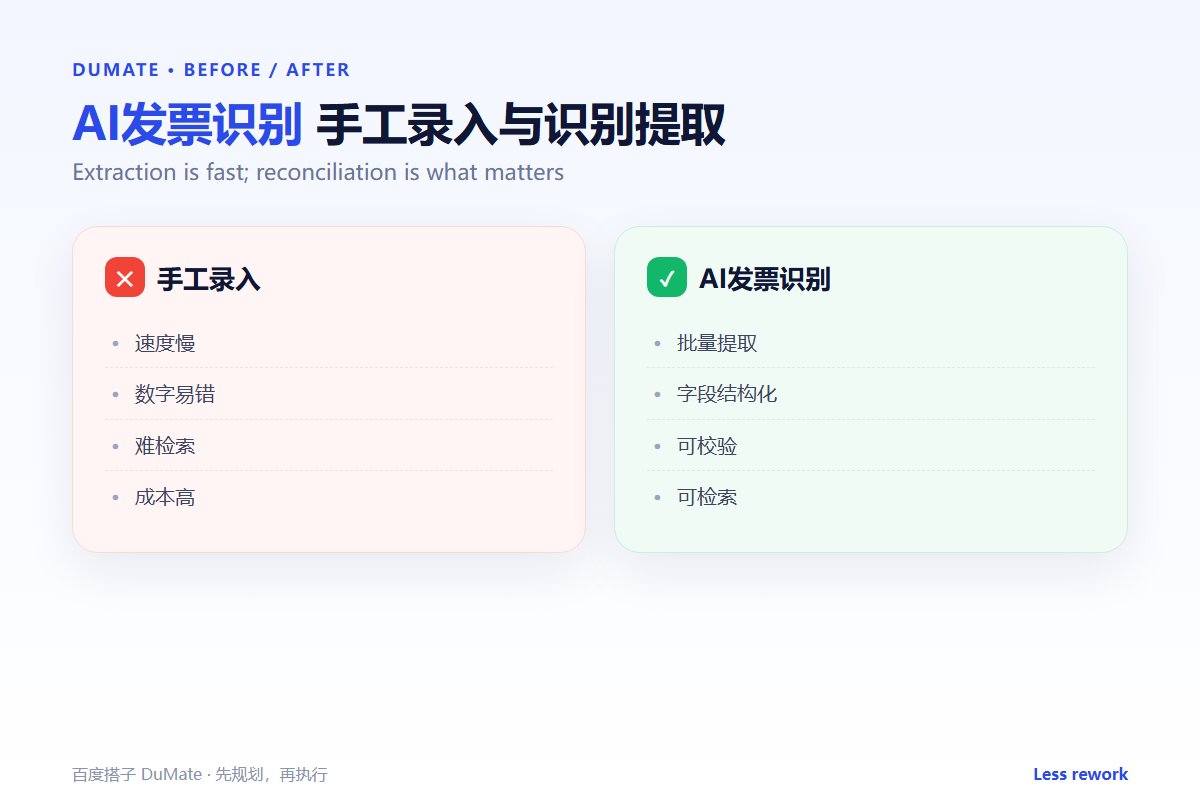
Before, one person typed invoices for two days at month-end, and the team still found errors during review. After, AI发票识别 extracts the fields in minutes, a reviewer checks the four critical fields, and month-end close starts with clean data. The saved time goes into analysis instead of typing.
The process also improves morale. Nobody enjoys copying invoice numbers. People do enjoy answering the question of why a cost center is over budget.
A monthly reconciliation is the simplest way to keep AI发票识别 honest. Pick twenty invoices at random, compare the extracted fields with the images, and record the error rate. If the rate rises, check the scanner and the vendor templates before blaming the model.
Teach the team what AI发票识别 cannot see. A stamp over a total, a handwritten correction, or a note in the margin should always trigger a manual look. The tool is a first pass, and the reviewer is the control.
Keep the extracted data in one table with a link to each image. When finance asks a question, the answer should take seconds. That table is the real product of AI发票识别, more than any single extracted PDF.
Start with one vendor and one month before rolling out to the whole ledger. A small pilot exposes template problems early, and it gives the team time to agree on the four fields that must always be checked.
Make AI发票识别 part of the close checklist, not a separate project. When AI发票识别 runs before the first close meeting, the team discusses exceptions instead of data entry. That shift is small on paper and large in practice. Documenting that boundary is part of a mature AI发票识别 process.
FAQ
Can AI发票识别 work with photos?
Yes, if the text is sharp and the page is flat. A scanned PDF is usually better than a phone photo.
Should we trust confidence scores?
Use them to prioritize review, not to skip it. A high score on a bad image can still be wrong.
How long should we keep the images?
Follow your finance and legal retention rules. Keep the image and the extracted data together for the full period.
延伸阅读
For scanned documents in general, see AI OCR识别. To reconcile extracted rows, read AI表格处理. Clean data before analysis with AI数据清洗. The reimbursement flow is covered in AI差旅报销. Access rules matter for finance data, so read AI权限管理. External references: NIST AI Risk Management Framework and ISO/IEC 42001.
评论
还没有评论,来说两句吧。以下为本文的引用通告: